Add first keywords
The keyword dashboard is where most of your week-to-week ASO work happens. Getting the first keyword set right — broad enough to cover your category but specific enough to be meaningful — is worth a few extra minutes up front.
Before you start
Your app should already be connected (see Connect an app). You don't need existing rank data; Marteso will fetch rankings for any term you add.
Step 1 — Discover keywords
Marteso's keyword discovery runs an automated scan to find the most relevant App Store search terms for your app, based on your app's category, metadata, and the keywords top competitors rank for.
How to kick off discovery:
- Open Keywords for your app.
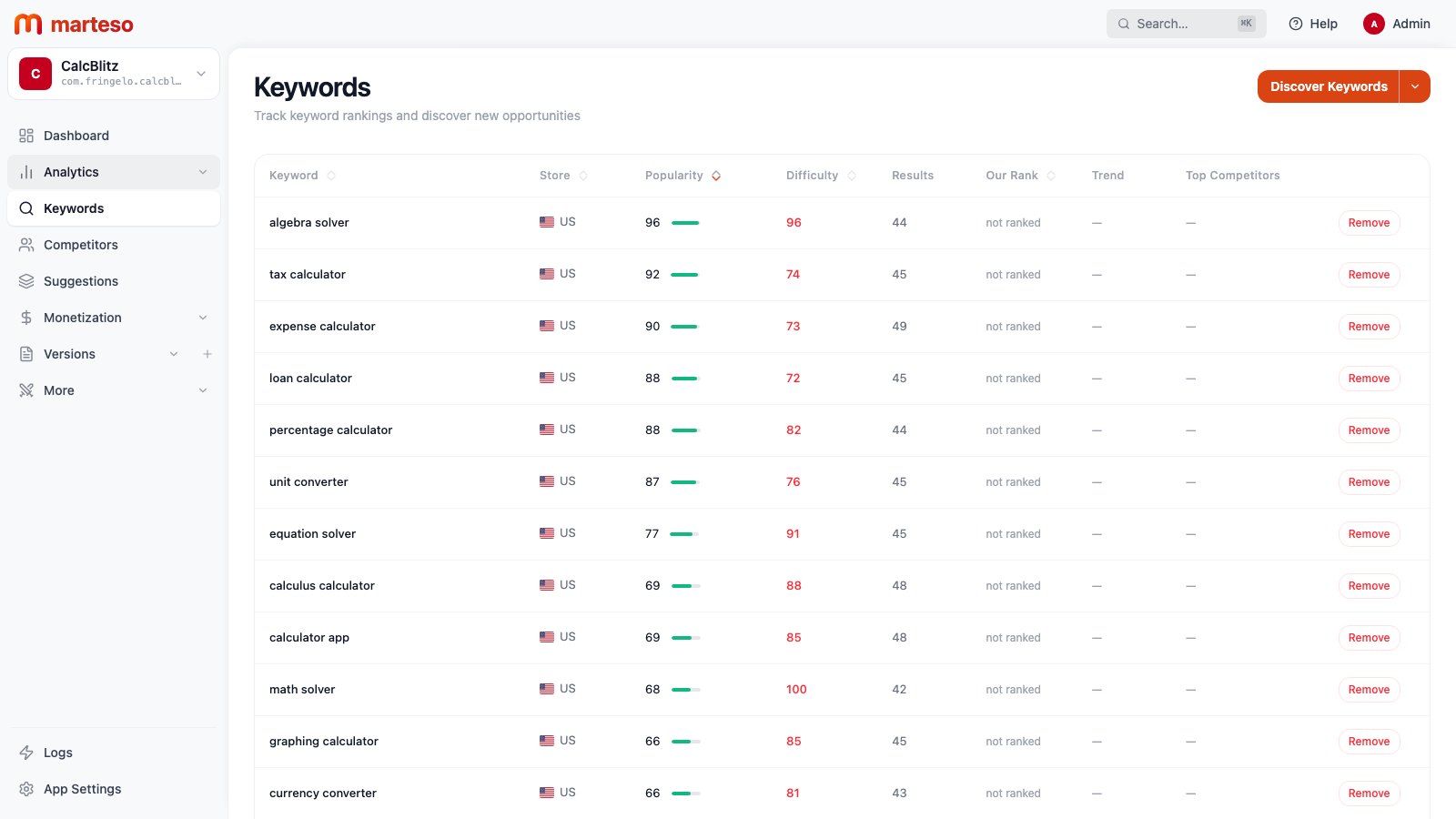
- Click Discover Keywords.
- Marteso enqueues a discovery job. Results appear in the keyword table within a few minutes.
Once the initial set is populated, review the list and remove any terms that don't match your app's actual use case. The keyword table shows each term's popularity (search volume, 0–100), difficulty (competition, 0–100), and your app's current rank.
Step 2 — Choose countries to track
Each keyword is tracked per storefront. Marteso uses your app's primary country (set during app setup) by default.
Recommended starting points:
- Add your primary country (the one you set during app setup)
- Add any country where you have existing users or revenue
- Add 1–2 aspirational markets if you're planning localization
You can track the same keyword in multiple countries and compare rankings side by side in the dashboard.
Tracking more countries increases the data Marteso needs to fetch. If you're just starting out, one or two countries gives you a clear baseline without noise.
Step 3 — Understand rank updates
App Store rankings change daily. Marteso refreshes keyword ranks on a daily cycle, typically overnight for each storefront.
| What you'll see | When |
|---|---|
| First ranks appear | Within 24 hours of adding a keyword |
| Daily rank updates | Each day, typically 02:00–08:00 UTC |
| Historical chart data | Builds automatically after 3+ days of data |
What "no rank" means: If a keyword shows — instead of a number, your app isn't in the top 250 results for that term. Marteso only records positions 1–250; anything beyond that is treated as unranked.
What to do next
Once your first ranking data arrives (check back after 24 hours):
- Look for any term where you're already in the top 10 — those are your strongest signals for the current keyword strategy
- Look for high-popularity, lower-difficulty terms where you're ranked 20–50 — those are often the fastest wins
- Open the Keyword research guide to learn how to interpret the full dashboard and plan your first optimization